01 / For the ear
Write for the ear, not the page
A sentence that reads well on a website can feel awkward when spoken aloud. Use familiar words, short sentences and contractions where they sound natural. Read the draft out loud and change any phrase that makes you stumble.
For example, instead of “Today we will be discussing the various ways in which you can improve your recording workflow,” try: “Today, I’ll show you how to make recording a video easier.”
Keep the meaning accurate, but let your own vocabulary and rhythm come through. How to write a short video script walks through a simple structure for that draft.
02 / Near the lens
Make the script easy to see
Place the script as close to the camera lens as your setup allows. InOne displays the script over the camera view, and you can adjust its text and placement to make reading more comfortable. Raise your phone to roughly eye level and check the framing before recording.
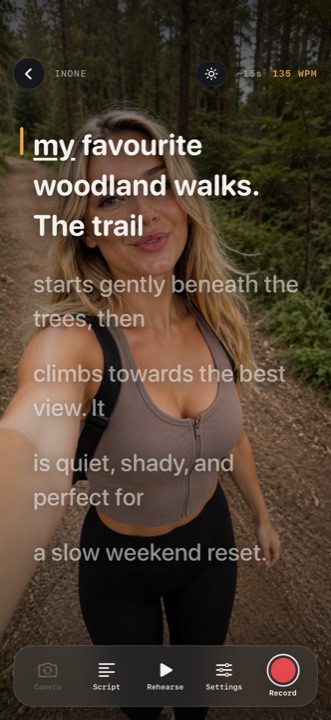
Choose a text size you can read without squinting. If your eyes need to travel a long way across each line, try adjusting the script’s placement or text settings. Record a short test and watch it back to see what works for you.
03 / Pace
Set a comfortable pace
Start with scrolling slightly slower than you think you need. Leave space to emphasise a point, take a breath or react naturally. A small pause is usually less distracting than rushing to keep up with the words.
InOne offers adjustable automatic scrolling and Follow My Voice. Follow My Voice is designed to move the script as you speak and wait when you pause, where speech recognition is available on your device. Try both approaches to see which suits your delivery. How voice-activated scrolling works explains the difference.
04 / Rehearse
Practise the idea, not just the words
Before recording, read the script once and identify the point of each section. Then practise explaining those points as though you were speaking to one person. Knowing where the message is going makes it easier to recover if you lose your place or change a word.
Use rehearsal to check your delivery, framing and sound. You do not have to make the first attempt perfect. A shorter companion note is Read to camera without looking away.
05 / After a stumble
Keep going after a stumble
If you make a mistake, pause and repeat the sentence. You may be able to use the stronger attempt when editing. With InOne Pro you can review filler words and pauses, choose cuts and combine clips from different takes. You decide what is removed.
When you watch the result back, keep pauses that make the message easier to follow. A natural delivery has variation in its pace and tone.
06 / Questions
Frequently asked questions
Where should I put my teleprompter text?
Keep it close to the camera lens and position it where you can read comfortably. Make a short test recording and adjust the text if your eye movement is distracting.
Should I memorise my script first?
You do not need to memorise every word. It helps to understand the structure and practise the opening so you can concentrate on explaining the message.
How can I stop rushing when using a teleprompter?
Slow the automatic scroll, add natural breaks to your script and rehearse aloud. You can also try voice-following mode if speech recognition is available on your device.
Learn more about recording with InOne.