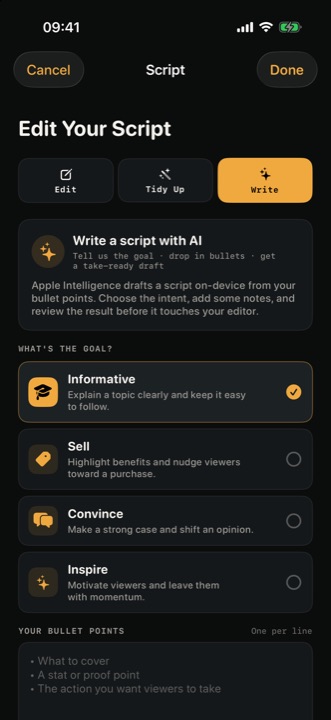
You can write or paste a script in InOne and read it from the teleprompter while recording. If you have notes rather than a finished draft, supported Apple Intelligence writing tools can help you develop or tidy the text. Review every suggestion before applying it.
01 / One point
Decide what the viewer should take away
Write one sentence for yourself: “After watching this, the viewer should understand…” Finish it with a single point. If you need several unrelated points, consider making separate videos rather than fitting them all into one script.
For a tutorial, the point might be: “The viewer understands how to prepare a script for a teleprompter.” For a product update, it might be: “The viewer knows what has changed and how to try it.”
02 / The opening
Open with a relevant question or problem
Your opening should make the subject clear. You do not need a dramatic claim. A direct question or recognisable problem gives the viewer a reason to keep listening.
For example: “Do you keep losing your place when you record a video?”
03 / The steps
Explain the answer in a few steps
Give the viewer the information they need in a sensible order. Use one idea per sentence where possible, and replace long phrases with simpler ones. If you are demonstrating a process, name the action before explaining why it helps.
A simple outline is:
- Problem: What is the viewer trying to do?
- Answer: What approach will help?
- Steps: What should they do first, next and last?
- Next action: What can they try now?
04 / The ending
End with a useful next step
Match the ending to the video. You might invite the viewer to try the technique, visit a page for more information or watch a related tutorial. Make the action specific and easy to understand.
05 / An example
Example: a short script
Keep losing your place when you record? Try writing your message in three parts: the problem, your answer and one next step. Read it out loud and replace any sentence that feels awkward. Then put the script close to your camera and practise at a comfortable pace. Your next video does not need to be perfect — it just needs to make your point clear.
This example is a starting point. Change the wording, detail and call to action to suit your audience and subject. For the delivery itself, see How to read a teleprompter naturally.
06 / Revise
Read it aloud and revise
Listen for sentences that run out of breath, repeated ideas and words you would never normally use. Add line breaks where they help you follow the structure. Then rehearse with the teleprompter and adjust the scrolling or text settings as needed.
InOne is free for iPhone and iPad. InOne Pro unlocks longer scripts and recordings, watermark-free video and the full set of writing, recording and editing tools. The limits in the app are the ones that apply, and the price and any eligible trial appear in the purchase sheet before you buy.
A shorter note on the same idea is Write a script you can say out loud.
07 / Questions
Questions
Can AI help write a video script?
InOne’s writing tools can help turn notes into a draft or tidy existing text using Apple Intelligence on supported devices with a compatible iOS version. Treat the result as a draft: check the facts, choose the wording that sounds like you and review suggested changes before applying them.
How long should a short video script be?
There is no single ideal word count. Speaking speed, pauses and the complexity of the topic all affect the length. Read your script aloud and time a rehearsal; then cut anything that does not help the viewer understand the main point.
Start your next script with InOne.